Recently, Apple released iOS 11 and with the update are some great new features. I have put this video together of some of my favourite new features which I think teachers will find really useful.
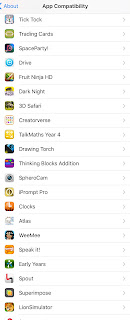
The downside with the new update is that there are now quite a few apps that will no longer work. @ICTEvangelist recently blogged about this and how to find out which ones are no longer compatible with iOS11. You can read it here.
On my iPad there are 810!!! Now some of them I have downloaded and never used in the classroom. There are however a number that I regularly use and am gutted they will no longer work. Tellagami, Thinking Blocks, Epic Citadel and some of the AR apps I had, are the ones that stand out the most. Luckily with iOS11 the ARKit will bring some impressive new apps into the classroom.
Fingers crossed, most of the developers will be able to update the apps in the near future. Here is the list of apps on my iPad that will no longer work:
For the past couple of weeks, I have been working with Year 2. Their topic is "Something old, something new." This has been linked to the story - Granny's Quilt by Penny Ives.
Last week, the students used the app Shadow Puppets Edu to record their thoughts on pictures of things from my youth which has now been replaced with modern technology. You can watch their efforts here.
This week we used the same app for a different task. Now the children had read the story a few times in class, I challenged them to create a video retelling the story in their own words.
The reason why Shadow Puppets Edu has become one of my go-to apps for KS1 is how versatile it is and how simple it is for pupils to use. Once they had selected a number of images from the book, they recorded themselves explaining that part of the story and then repeated the process for each image and then saved the finished video to their Seesaw portfolios.
So a couple of weeks ago, I shared some medieval pictures from my Instagram account (@ICT_MrP) that depicted life as a teacher. You can read this blog post here.
Today I worked with Year 2. Their new topic is "Something Old, Something New." I decided to challenge the pupils to record videos explaining some objects from my youth which have since become obsolete due to more developed technology.
It was inspired after I saw this video online:
After providing pictures of a variety of objects:
The children used the app Shadow Puppets Edu to create short videos explaining what they thought these objects were and what they were used for. I have to admit I had a laugh at some of their innocent suggestions, which cheered me up after I realised how old I am!
Once we completed the first video, we spent time talking about the objects and what they actually did and how modern technology has replaced many of them. The children then created another video giving an explanation of what they had learnt about each object.
Using the app Shadow Puppets gave every child the opportunity to express their predictions and ideas and new found understanding. It allowed the children to practise their oracy skills and continue to develop key digital literacy skills by recording, editing and then uploading their final efforts to Seesaw.
I am so excited to announce that the latest Read Write Perform pack is now available. We hoped it would have been available a little bit earlier, so we can only apologise for this. We have been inundated with questions as so many people have been waiting for this one.
Hopefully, it will be worth the wait.
The year is 1066. William, Duke of Normandy, is livid: he thinks he should be king over Harold. He sets sail from neighbouring France with a great army - not just a thumbs up ‘great army’ but a ‘wow, that’s a rather large and intimidating ‘great army’.
The Battle of Hastings, The War of the Roses, the Roman invasion, these are just a few of the significant events which have shaped Great Britain. Let your pupils retell these events in the form of a humorous report, just like Bob Hale from Horrible Histories.
A Unit of Work aimed at Key Stage 2 & 3. Through reading, researching and then writing an explanation text about a significant historical event, children create their own humorous historical report.
The aim is to cover all elements of the English curriculum in an engaging and purposeful way using a variety of media.
With an additional focus on Fluency for Meaning, this pack will help your learners appreciate the role of the narrator more fully. It will support them as they gain a better understanding of the narrator's role when reading aloud and help them to reflect upon how their voice can be used effectively, not simply to convey what is happening but also to bring the text to life.
The pack also contains contextualised SPaG sessions that focus on shifts in formality and the impact this has on the audience.
This pack includes:
Comprehension lessons that integrate and develop core reading skills at Word, Sentence and Text Level.
Writing lessons that encourage collaborative learning and independent creative writing that embeds grammar in a meaningful way and helps learners understand what it means to be a real writer, one who writes for an authentic purpose and with a particular audience in mind.
Performance lessons that develop reading fluency and a deeper understanding of their own work and that of others, as well as help improve personal social skills and confidence.
By the end of each Unit of Work, teachers will have written and video evidence of each of their students' work. This work can be shared with a wider audience, be assessed for moderation and will inform your future planning.
Recently, I shared this video about some little-known punctuation marks:
It seemed to get a great reaction from teachers so I decided to put together a little video to show how you can add some of these punctation marks to your iPhone or iPad keyboard. The following video explains how to do it:
Here is a video with some of my top tips for the new school year. This isn't tech based, it has more of a focus on wellbeing! Please feel free to share:
Over the summer, I have created a series of videos using clips from the show to depict life as a teacher. I have created 7 different volumes, one for each season.
I hope you enjoy, if you do, please follow my page on Instagram:
Firstly, a massive shout out to @MrPieLee as it was on his Instagram page where I first saw this app in action.
I love using visuals in my teaching, I love allowing my pupils to use technology to create and share their understanding through the use of visuals.
I love the Live Photo feature in newer Apple devices which brings photos to life by recording what happens 1.5 seconds before and after you take a picture. I previously blogged about Live Photos and how we used the app Quik to share our recent Year 6 residential with parents. You can read it here.
This is an example of a video where we used the live photo option.
The added movement adds so much more when sharing and presenting. This was a message that came through when I attended a session at the recent Apple ADE summit. The app Plotagraph is a fantastic tool to add animation to a photo.
The app isn't the cheapest, at roughly around a £5, it is more on the expensive side for an app. However, it is a great tool to bring pictures to life.
Very simple and easy to use:
The Animation Tool to bring the image to life. Simply choose which direction you want the picture to move.
Use the mask tool to select the part of the picture which will stay static.
The Erase Tool allows you to be more precise with the editing.
The Anchor points allow you to pin areas that won't move.
Then you should be able to create something like this:
A picture of my kids at the park with the sky moving. This image has been saved as a GIF which came as a recent update within the app. You can export the finished product as a video or GIF.
Although I have yet to use the app in the classroom I think it will be a great addition to some of the creative apps I use. It will integrate brilliantly with other apps like Book Creator, Explain Everything, Adobe Spark Video and Keynote. It can also provide an exciting way to bring text to life to compliment and enhance reading and writing. It is something I am definitely going to use in the classroom in the new year so I'll be sure to share what the children create.
Talking of apps to enhance photographs, my good friend @ICTEvangelist recently blogged about some other useful apps for editing and improving pictures. Check it out here.
One of the most exciting things to come out of the Apple ADE Summit was being part of the TechTeachGoals project. I have previously blogged about it here. Here is a quick video explaining the project:
The project will be sharing different apps and tools to use in the classroom to support different areas of teaching and learning. The first set of videos focused on assessment. These videos will hopefully give you an insight into some useful tech tools to use in the classroom to help with all things assessment.
Social Media is such a powerful tool to use in the classroom. I talk about this a lot on my training; demonstrating how it can be used to enhance learning in lots of different ways in the classroom and beyond.
As a teacher, I love using social media as a CPD tool. I have always been a massive advocate of using twitter as a teacher. One of my early blog posts talks about why every teacher should be on twitter, you can view it here.
Personally, I now find Facebook to be an excellent way to discover new ideas, share resources and gain inspiring insights and views on everything education related. There are a wealth of Facebook groups where you can post questions, share ideas and resources and learn from some amazing teachers all over the world.
The reason why I would recommend joining these groups is that it gives you a platform to ask questions beyond your school walls. Sometimes, you may find yourself in a school where the other staff aren't as supportive or have a particular way of doing things that you may not necessarily agree with. Being able to discuss and ask questions through these groups is a great way to build your PLN. A word of warning though, you may get a little carried away scrolling through posts on these groups, where hours have passed before you put your phone down!
Here are 5 of my favourite Facebook Teacher groups:
With over 70k members, this group is a fantastic forum to share, learn and find some fantastic resources to use in the classroom. Another similar page is Teachers - sharing ideas and resources.
For more of a specific focus as far as year group, the Year 3/4 group has over 20,000 teachers who regularly post questions, share resources and discuss all things relating to Lower KS2. There is also a Year 5/6 group and a Year 6 teachers group you can join too. If you are part of the SLT in your school, you may also find Primary School Leaders useful.
As Seesaw is one of the best tools I use as a teacher, this group has been invaluable as far as learning about the app, asking any questions, suggesting improvements and learning about new updates. It is also worth mentioning that Book Creator has a group for teachers too.
Ok, so my page isn't exactly a group but there are a wealth of teachers all over the world who follow and like the page. I have teachers regularly messaging asking for advice or ideas. I try my best to answer as many as I can, however, when I am stumped I always ask people to use the post to page option. Here, everyone who follows the page can read and hopefully answer the question.
I am sure there are plenty of other pages and groups teachers can join to help them build their PLN and find ideas, resources and have questions answered and discussed. I just wanted to share a couple of groups that I use regularly.
If you feel I have missed a really useful Facebook group, please share the link in the comments of this post.