A few months ago, Facebook gave me the opportunity to launch a supporter aspect to my page. For £3.50 a month, teachers can subscribe to receive the following benefits:
This platform, for me, is a way to bring my CPD training in schools online. I regularly receive messages from teachers saying that they would love to attend one of my CPD and Inset sessions, however, due to one reason or the other (location, school not allowing them to go etc) they can't make it. It gives teachers the opportunity to take ownership of their own professional development. I honestly think that the best resource in the classroom is the teacher and I want this platform to be a way teachers can build confidence in knowledge to best make use of the technology in their classroom.
So far, it has been amazing to have so many people sign up and the feedback has been so positive, especially when you see teachers using the ideas and sharing the incredible work from their pupils.
Over the Christmas break, I designed a website to make it really easy for supporters to navigate and easily access the exclusive CPD content. Anyone can view the website to see everything we've posted so far. We are adding more content each week. When you sign up you can access everything we have posted since the beginning, including the eBooks.
Please do visit the new website - MrPICT.com - by tapping the picture below.
As much as I love technology, I will always talk about the importance of reading on my CPD sessions. It really annoys me when people like to blame technology as a reason why children don't read as much. We like to blame technology for a number of things but for me, it comes down to choices. I hope through this blog and my social media pages, I demonstrate how, when used effectively, it can transform teaching and learning. Unfortunately, I think too many of us make the wrong choices with technology.
When pictures like this appear on my social feeds, it does wind me up because they both can be valuable and certainly enhance each other:
For me, technology can enhance the reading experience allowing pupils to explore texts in more creative ways. This is something I wanted to promote in my yearly Christmas video.
For the past 9 years, I always treat my pupils to a silly video at the end of our annual talent show. To see what I have produced previously - CLICK HERE.
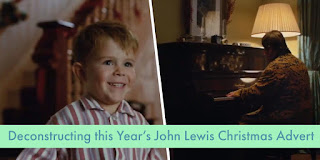
This year, I decided to do something with a more serious message. I absolutely love the new John Lewis Christmas advert. In fact, I blogged some ideas for how you can use it, click the picture to see.
Inspired by this advert, I created my own looking at how reading can take you to some magical places. Please help share this important message by sharing the video far and wide!
Here’s my version of the John Lewis Christmas advert all about my love of reading for pleasure!
You will have seen over the past half term I have been working on a very important topic with Year 4 inspired by the Greenpeace "There's a Rang-Tan in my Bedroom" advert.
This has since been used by Iceland Foods as their Christmas advert but has been banned from TV.
This has culminated in a very special project where my class have all become published authors.
To read what we have done so far, click the pictures:
The first link looks at the advert in more detail and the work my class produced writing in role as an Orangutan seeing their home destroyed.
The next post looks at the letters my class have written to all the companies with links to dirty palm oil and the responses we have received.
Over the past couple of weeks, we have been learning more about Orangutans. We started by generating questions we wanted to find the answers to and then looked at researching on the internet to find the answers to the questions. This gave me the opportunity to discuss and teach the children about researching and how to do it effectively.
The children used their research to create interviews with the Orangutan using the app Animate Anything:
Every pair was then given a question to answer and using the app Book Creator, they designed a page sharing the knowledge and understanding linked to the question. The finished pages were then combined to make a class eBook. What we decided to do with this eBook is publish it onto the iBooks store. Click here to learn how we did this.
We decided to sell it for 49p with all the proceeds going to help the Orangutans. You can download the eBook by clicking the picture:
Since its release, I have been astounded by the response! Over the weekend, I watched it shoot up the iBooks store chart, eventually peaking at number 8! That's 8 out of every eBook on the iBooks store. Yes, not only have my class become published authors with a book that has a proper ISBN number but at one point over the weekend they were the author of the 8th best selling eBook in the UK!
So the next time you hear a teacher question how technology is a waste of time, a gimmick or adds little to learning, show them this blog post.
Here are my class with the money they have raised so far:
They will be splitting the money between the WWF and Greenpeace. They have already used some of this money to adopt an Orangutan.
A few weeks ago, I blogged about a project my Year 4 class had started, inspired by the recent Greenpeace advert - There's a Rang-Tan in my Bedroom. To read that blog post, which includes original questions linked to the advert, please click the picture:
The response we received from the video the class created where they wrote in role as a helpless Orangutan, seeing their home destroyed was so positive and empowering. Again you can read more about this by clicking the picture above. If you haven't yet seen the video, here it is:
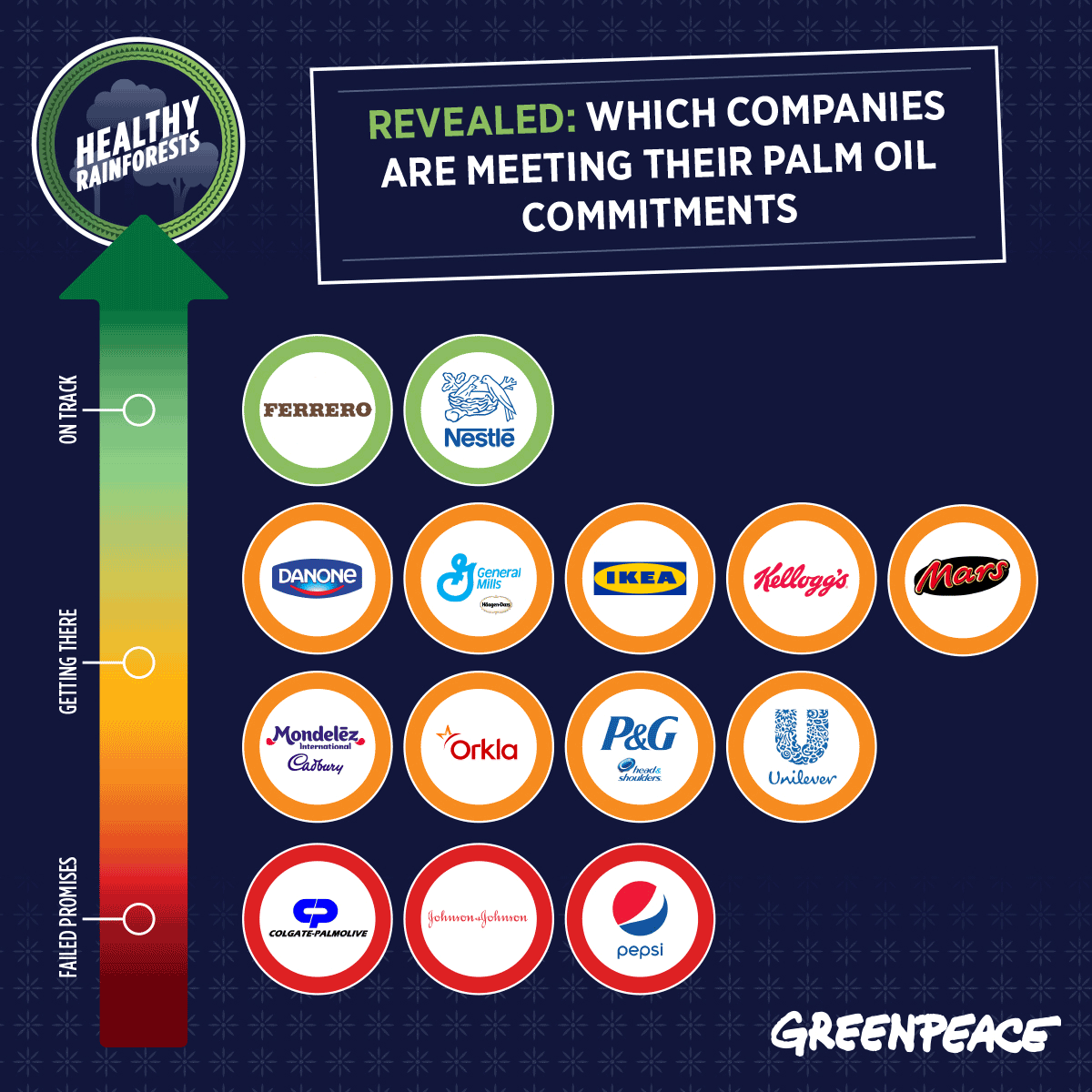
From the reaction to the video, my class were inspired to go further and investigate the issue more. We discovered this from Greenpeace, which identifies companies with links to Dirty Palm Oil:
According to Greenpeace, these companies made a promise to be clean of dirty palm oil by 2020. My pupils decided to write to these companies to provide a polite reminder and ensure they are on target to keep their promise.
After drafting their letters, I gave quality oral feedback through our iPads, this is something I cover on all my CPD sessions and will also be demonstrating on my subscription page on facebook.
The pupils were then given the opportunity to transform their writing into a video using Adobe Spark Video. This is another example of the READWRITEPERFORM approach in action. These videos were then tweeted and emailed to all the companies identified in the above image. Here is an example from our pupils:
Please let my class know what you think by leaving a comment on this video on facebook.
So far, we've received a lot of replies from the companies. I can't wait to share them with my class as they'll see how their writing is making a difference:
We will keep you updated with this project as we continue to learn about it in class.
I regularly receive messages from teachers saying that they would love to attend one of my CPD and Inset sessions, however, due to one reason or the other (location, school not allowing them to go etc) they can't make it.
I have been thinking for a while about trying to create some sort of online platform where teachers can access more detailed CPD content. I have and always will share content for free through this blog and my social media pages. However, I always need to strike the right balance as to make sure I don't give too much away for free as this often backfires in loss of work in schools and also a number of people who then take the ideas, rip them off and make money on the back of it.
About a week ago, Facebook introduced Fan Subscriptions. Followers of my facebook page can subscribe for £3.50 a month and receive exclusive content.
I've decided to give this a go, to hopefully support more teachers in their journey to utilise technology more effectively. This short video explains why I am doing this:
To ensure this package is both useful and worthwhile to teachers, I want to hear from you! I have created this Google Form, which you can add to as often as you like. It gives you the opportunity to let me know what support and content you want. Feel free to share ideas, even if you haven't yet signed up.
As the above video stated, I will be giving the first 1000 subscribers a copy of each of my eBooks for Free:
To give you an idea of the sort of content I want to be creating exclusively for subscribers, here is an example of what I had in mind:
In Year 4, we have been inspired by the latest Greenpeace Advert - There's a Rang-Tan in My Bedroom. The advert tells the story of Rang-Tan, a young Indonesian orangutan that has been forced out of her home by humans. It is a beautifully animated video with a very powerful message:
We decided to look at the text used in the advert in more detail:
There's a Rang-tan in my bedroom and I don't know what to do. She plays with all my teddies and keeps borrowing my shoe. She destroys all of my house plants and she keeps on shouting 'oo'. She throws away my chocolate and she howls at my shampoo. There's a Rang-tan in my bedroom and I don't want her to stay, So I told the naughty Rang-tan that she had to go away. Oh, Rang-tan in my bedroom, just before you go, Why were you in my bedroom? I really want to know. There's a human in my forest and I don't know what to do. He destroyed all of our trees for your food and your shampoo. There's a human in my forest and I don't know what to do. He took away my mother and I'm scared he'll take me, too. There are humans in my forest and I don't know what to do. They're burning it for palm oil so I thought I’d stay with you. Oh Rang-tan in my bedroom now I do know what to do. I’ll fight to save your home and I’ll stop you feeling blue. I’ll share your story far and wide so others can fight too. Oh Rang-tan in my bedroom I swear it on the stars: the future's not yet written but I’ll make sure it's ours.
Some questions we explored:
What is a Rang-Tan?
Why do you think there is an Orangutan in her bedroom?
Why does the young girl not know what to do?
What does the word 'destroy' mean?
Why does the Rang-Tan howl?
Why doesn't the girl want the Orangutan to stay?
What word does the girl use to describe the Rang-Tan?
Do you think the Rang-tan is naughty? Why?
On a scale of 1-5 how desperate is the girl to know why the Rang-tan is in her room?
Where does a the Rang-Tan live?
Why are humans there?
Why are humans destroying the forest?
Why does the Rang-tan keep repeating the line "There's a human in my forest..."?
What do you think happened to the mother?
What is the main reason for burning the forest?
What is palm oil used for?
What clues in the video let us know what palm oil is used for?
How does the girl feel about the Rang-tan at the end?
Why do you think her opinion has changed?
How will she fight? Why will she fight?
How can she share the story far and wide?
What would you do if you were the girl?
Do you think this advert is effective? Why?
How can we help?
The advert certainly empowered the class to explore the issue further. We discussed how terrifying it must be for the orangutans when the diggers and trucks come and demolish their rainforest home. We decided to write stories as Orangutans going through this experience. We considered how to create the most effective story by using different elements:
A short, effective hook opening sentence.
Describing the weather to create the mood.
Describing how we felt through our actions.
Using multi-sensory descriptions to help the reader visualise the horrific scene.
Changing the length of our sentences for effect.
How to not use words like diggers/trucks but instead describe them as monsters and beasts.
Although it was their first draft, I was really impressed with the writing the students produce. The children knew that the work they produce would be shared online for the world to see, which added an authentic purpose:
During afternoon assembly, a group of pupils stayed out of the assembly and recorded some of their writing on the green screen to create this awareness advert:
We would love your support by sharing this video and commenting on it. We are hoping this will help raise awareness of this issue but also inspire year 4 to continue to write and share more about this issue. So far we have received messages from Greenpeace and WWF:
So please show your support and encourage our learning by sharing and commenting on their work. Watch out for more work which will appear on their class blog over the next few weeks!
If you want to support the Greenpeace campaign to #StopDirtyPalmOil, sign the petition here.
Since the update Keynote received over the summer, which unleashed a wealth of creative possibilities, I have been desperate to give it a go in class.
In Year 4, we decided to create our own self-portraits to get used to the drawing tools. Although we had an issue updating a few of the iPads (Keynote is a big app) we had a good go and I was really impressed with some of their efforts:
I've created a step by step guide for how to do this activity with your class. You can watch it here:
This will be an app I will be exploring a lot more this year in my school so stay tuned!
#EveryoneCanCreate is a hashtag I have very much enjoyed following since the ADE summit in Texas this month. From some of the ideas I had seen, my son created this before his school trip to the zoo:
I decided to give this idea a try today and turned a video I had posted into a line drawing animation. You may have seen the #KikiChallenge doing the rounds on social media. A dance to the latest Drake song. It is something my daughter has picked up on and so we decided to make our own version (obviously done in a safe way with the car parked 😉)
Following the brilliant guidance from Mat above, I took a few screenshots, imported them into keynote and used the line drawing tool to trace around each picture, exported as a film and increased the speed in iMovie to create:
Although it took a while to create this, I felt very proud of the finished video. The possibilities for this tool is endless and I am excited to see how this will be used in the next year. It is another great way in which Keynote can be used to inspire creativity in the classroom.
Mat has now published an eBook exploring the line draw animation tool further. You can download it by clicking the image below:
I am not going to lie, I am very jealous of all the amazing teachers attending the Global ADE 2018 summit in Texas. I have been closely following the hashtag #WWADE2018 and #EveryoneCanCreate and enjoying some of the amazing content being created and shared.
It has reminded me of all the brilliant new additions to the Keynote app and inspired me to try some with a project with my children. They are going on a school trip tomorrow to the zoo and so created this animated quiz about animals:
Keynote has been an app that I have used personally in my CPD and training sessions for years. Essentially, it is Apple's version of Powerpoint. At the UK ADE summit last year I was very fortunate to get a one to one tutorial with a Keynote expert, Alan Rosenfield, who really opened my eyes to creating engaging content to support my training sessions. More recently, Apple have announced a number of new updates to Keynote which take the app beyond a simple presentation app to an incredibly powerful creative app.
Here are a few of the features we used in the video above. Each one can easily be adapted to a whole range of other topics and activities.
Drawing
The ability to draw adds an incredibly powerful dimension to the app in terms of creativity and animation. Take the Elephant example in the above video. The pupil added an image of the elephant from the shape tools and then traced over the top with an Apple Pencil (the pencil certainly helps in term of accuracy but isn't a necessity) they can then colour the image. But here is the lovely addition, once completed, you can tap onto the image, choose animate and select the line draw option. When you tap the play icon, it then plays back a video of your drawing. Here is a quick gif demonstrating this tool:
It was the brilliant @MrTullock who first made me aware of the line draw tool when I saw he had created this and shared it on his facebook page:
I had a play when I created this animation for our podcast:
The first thing we did in the animals video above was to create an image in Adobe Spark post of the glasses (see right). This was then added over the picture of the animal and using the Instant Alpha tool, you can make the lenses transparent.
To make the glasses move over the picture we used the Magic Move transition. This was repeated over a couple of slides. The following gif demonstrates this process:
The potential to this idea is massive. Giving clues about a part of the body or a planet linked to science for example. Maybe sharing clues about a book or a character in English. Revealing clues about a certain location in Geography or a famous historic landmark. This masking tool can also be added over video too, taking it a step further.
Recording Audio
Possibly the best addition is the ability to add audio recording to each slide. The best part is that it is so simple to do. Simply tap the + icon and choose the record audio option:
Once selected, the children can record at the bottom of the screen. The brilliant thing about it is how it easy it is for children to edit and re-record by just scrolling back and tapping record again. The pupils can stop, gather their thoughts and then continue to record and then insert the whole recording to the slide.
Image Animations and Transitions
With some of the other images, we simply used some of the animations to create the reveal picture. By adding an image and tapping the animate tool, you can then select the desired animation. You can then adjust the duration to match the audio the students have recorded.
Another option is to add different shapes over the image and using an effect to get rid of them one by one. Here choose the build-out effects and then order them to play automatically after each other.
These are just a couple of options we used but there is a wealth of others within the app.
Export as Video
Another brilliant addition is the ability to export every project as a movie. Previously, it would be a case of playing the Keynote and using the screen recorder option (which I have previously blogged about here.) With the movie export option, this saves a lot of time and improves that functionality.
So with all those amazing new additions to this fantastic app, the question is, what will you create?
As always, please do share anything you create using these ideas, all I ever expect is that you just give us a shout out and thanks for where the inspiration has come from. I can't tell you how demoralising it is when people use ideas from the blog and then try to pass them off as their own. Don't get me wrong, it inspires me to stay creative and original but when those ideas are then being used on other CPD sessions without any credit, I just find it very disappointing.
There have been plenty of occasions when my classroom has resembled a zoo!
But today, through Augmented Reality, we actually turned our EYFS classroom into a real zoo!
I've blogged about different ways you can use Augmented Reality (you can read them here) and it never ceases to amaze pupils and bring that moment of awe and wonder that technology can provide.
The app we used today was LEO AR camera. Using Apple's ARkit, the app allows you to scan the ground and place 3D animated objects into the real world.
There are a range of different objects you can add including different animals and dinosaurs. There is a horror option which may not be appropriate for your pupils. Today, we just used this app on my teacher device.
There is a record option which allows you to video the animated object within the scene alongside your pupils. This is a little buggy at the minute so today we just used the screen record option of the iPad to capture the interaction between the pupils and animals.
Once we had placed some animals in the classroom, we recorded each other standing with them. Using the app Apple Clips, the pupils then shared some facts about each animal. We put everything into a little video as a guide to our classroom zoo. Let us know what you think:
One of the best things about teaching is what children say that just astounds you. Sometimes the discussion and conversations you have with children can just completely blow you away. Don't get me wrong they often make you chuckle and laugh but when faced with a more serious conversation, I am always amazed at the depth some children show.
Today I had an amazing morning with Year 2 looking at proverbs.
I introduced the idea of a proverb as - A proverb is a simple and concrete saying, popularly known and repeated, that expresses a truth based on common sense or experience. They are often metaphorical. We also discussed a couple of examples, including:
Don't count your chickens before they have hatched.
We discussed the meaning behind this beyond the literal and examples - England fans who think we will win the World Cup because we won our opening game.
I then shared this document which had examples of famous proverbs but only the first part to them. You can download this here:
The children were then given the opportunity to complete the proverb with their own ideas. The children were aware of some but the challenge was to make sure the saying then had a message. I was blown away by some of their ideas but more their meanings. Take for example:
Take for example the first one in the top picture:
Beauty is in the eye of death.
Now, this might seem dark, but when I questioned the student, she explained that when someone dies we tend to only remember the beautiful things about them.
AMAZING!!!!
Once the children had created their proverbs, they were challenged to create a video on Adobe Spark Video where they could orally explain the meaning behind their proverbs.


 This platform, for me, is a way to bring my CPD training in schools online. I regularly receive messages from teachers saying that they would love to attend one of my CPD and Inset sessions, however, due to one reason or the other (location, school not allowing them to go etc) they can't make it. It gives teachers the opportunity to take ownership of their own professional development. I honestly think that the best resource in the classroom is the teacher and I want this platform to be a way teachers can build confidence in knowledge to best make use of the technology in their classroom.